Open to AI automation and workflow engineering roles
Muhammed Lizan
AI automation developer — n8n, Make, Claude API, Meta platform APIs, Supabase, Python
I build workflow automation that connects the tools a business already uses — customer conversations, lead follow-up, data that otherwise lives in a spreadsheet or in someone's head. Six builds are written up below, with the architecture of each and what actually decided whether it worked.
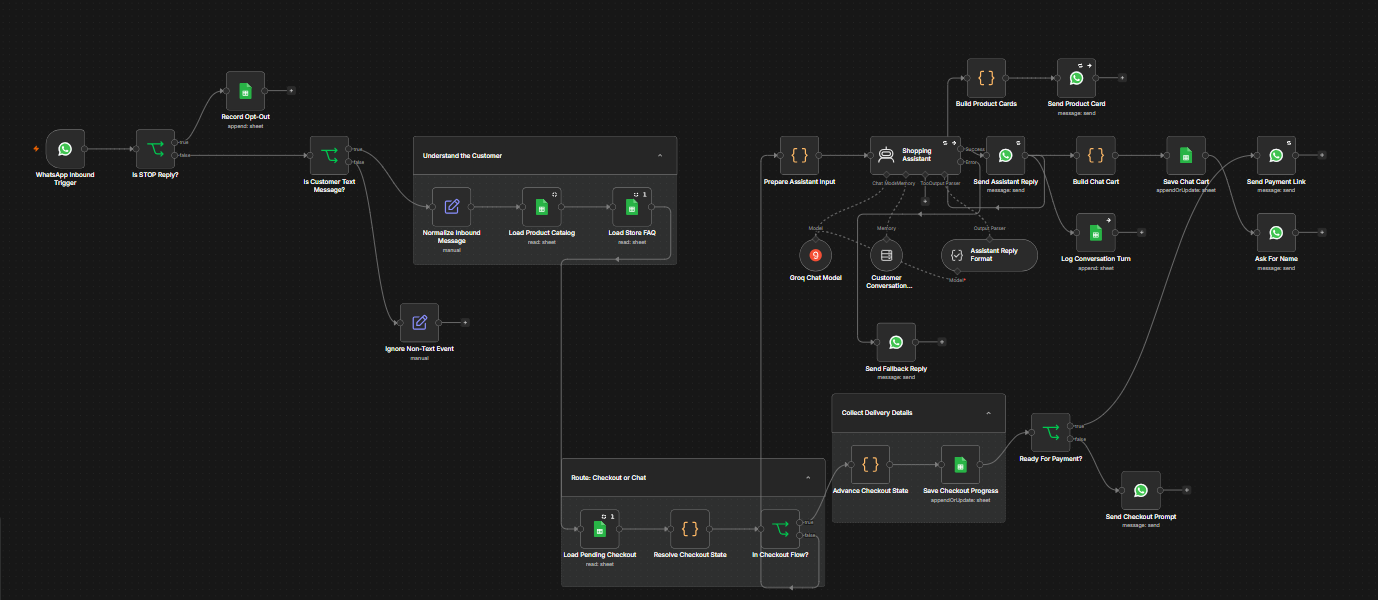
n8n — 29 functional nodes: inbound filtering, the checkout router, the assistant with its model and memory, then the send branches.
An AI shopping assistant that lives entirely inside WhatsApp. A customer messages the store’s number, talks to it in plain language, gets product cards with real photos and prices, and is walked through a name-and-address checkout before receiving a payment link — with no human, no app and no website. Built in n8n against Google Sheets: no custom backend, no hosting, no database.
One rule shapes the architecture. The model decides what to say; it never decides what is true. Prices, product images, stock status and payment links are read from the sheet by deterministic Code nodes, and the model is forbidden from writing a URL or a price. A hallucination can make the bot phrase something oddly; it cannot make it quote a wrong price or send a wrong link. An invented product ID is filtered against the real catalogue and simply sends nothing.
Every WhatsApp message is its own workflow execution, so nothing survives in memory between turns. The checkout therefore lives in a checkoutStage column as a state machine — awaiting name, awaiting address, complete — collecting one field per turn, re-asking on invalid input, with an escape hatch so a customer can never be trapped mid-flow. A router reads that state before the AI on every single message, which is why a delivery address is never handed to the model and mistaken for conversation.
The build’s hardest bug was a rate limit that would not move. The assistant kept failing against Groq’s 8,000 tokens-per-minute cap, and the requested-token count came back byte-identical after swapping the model and halving the memory window. A number that does not change when you change the thing you think causes it is measuring something else. The window-buffer memory stores user messages verbatim, so with the catalogue in the user message every remembered turn carried another full copy of it. Moving that context into the system message cut the prompt from roughly 8,100 tokens to 2,200 — a 73% reduction with no loss of capability — and the session key had to be versioned to force a clean buffer, because the old oversized turns were still being replayed.
Failure paths are explicit rather than silent. The agent retries twice, malformed JSON gets repaired by a second model call, and a total model outage falls through to a fixed apology so the customer never gets silence. Sends retry three times; a broken product image or a failed log write cannot fail the run.
n8nWhatsApp Business Cloud APIGroq (Qwen)AI agentstructured outputGoogle Sheetsstate machineJavaScript
2026 · 08Personal build
Instagram comment automation
comment posted
→
Meta webhook
→
ngrok tunnel
→
Flask server
→
Supabase rule lookup matched on post ID
→
public replyprivate DM
The rule dashboard: posts on the left, per-post keyword rules on the right. A keyword, a public reply and a private message, saved live.
A keyword in a comment triggers two responses — a public reply and a private DM — within seconds of the comment being posted. Keyword rules are per-post and stored in Supabase, managed through a password-protected dashboard. Adding a rule takes seconds and applies to the very next comment: no code change, no redeploy.
Two implementation details decided whether this worked at all. Private replies have to be addressed by comment ID, not user ID — that is the only way to open a DM thread with someone who has never messaged you, because addressing by user ID fails outside Meta’s 24-hour window. And loop guards are load-bearing: the bot’s own public reply comes back as a comments webhook and its own DM comes back as a message echo, so without a guard on each path the system answers itself indefinitely. A healthy live reply shows exactly three webhooks — the real comment, then two ignored events.
The bot fails soft and the dashboard fails loud. A database outage cannot take down webhook processing, but a save that silently did nothing is worse than an error, so the dashboard surfaces it.
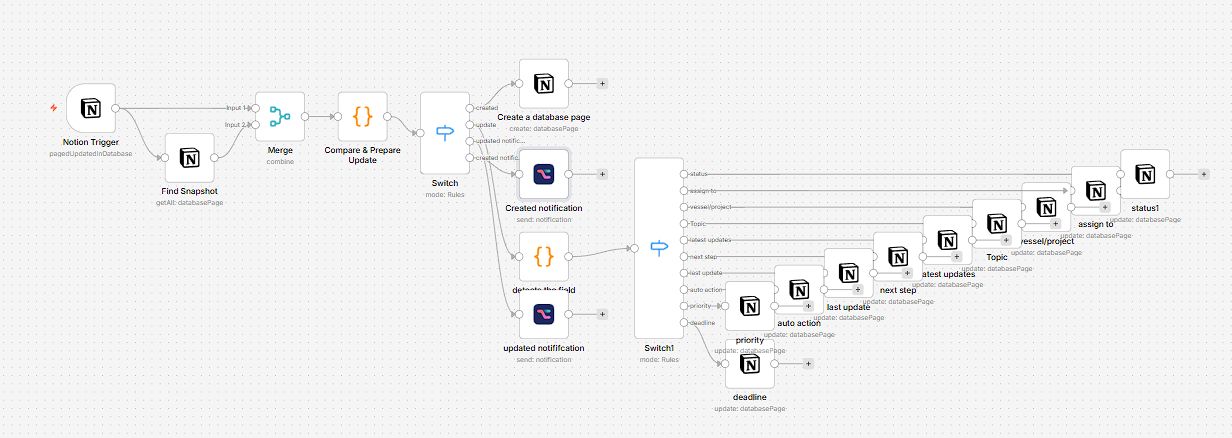
n8n — Notion trigger, snapshot lookup, field comparison, then a per-field update fan-out.
Most sync workflows push whole records and let the destination sort it out. This one holds a snapshot table alongside the live Notion database, merges the two on every update, and works out exactly which fields changed — then syncs only those.
The first switch separates newly created pages from edited ones and raises a different notification for each. The second fans out across the ten tracked fields — status, assignee, vessel/project, topic, latest updates, next step, last update, auto action, priority and deadline — so each updates independently instead of the record being rewritten wholesale. The point was precision rather than throughput: no redundant writes, every change traceable to the field. The project did not reach deployment for reasons outside the build.
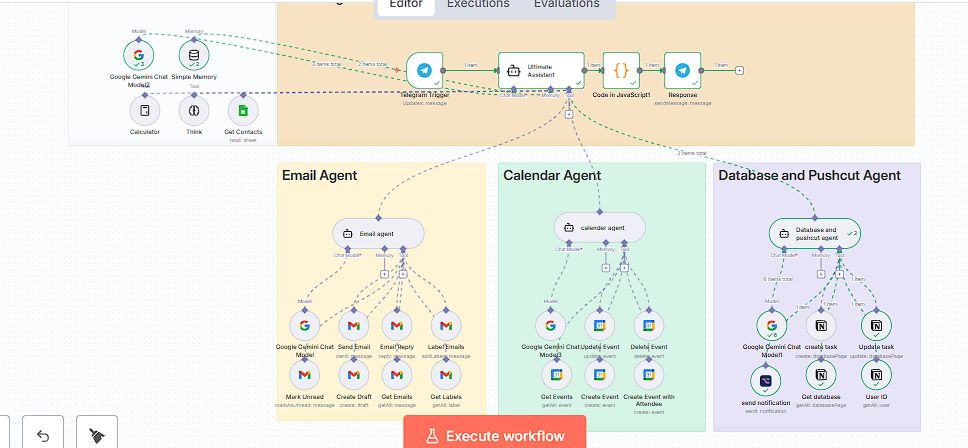
n8n — Telegram trigger into the central assistant, routing to the email, calendar, and database agents.
A Telegram message reaches a central assistant that decides which specialised agent should handle it; a JavaScript node then formats the result back into a reply. Three agents sit beneath it. The email agent sends, replies, drafts, fetches, labels and marks messages unread. The calendar agent creates, updates and deletes events, including events with attendees. The database agent creates and updates tasks in Notion, resolves the correct user ID before assigning one, and fires a Pushcut notification whenever something changes.
The assistant carries conversation memory and a few utility tools of its own — a calculator, a reasoning step, and a contacts lookup from Google Sheets — so a follow-up message lands in context instead of starting over. This was my first client delivery: the system took over their task management end to end, from creating a task against the right assignee to notifying them on every update.
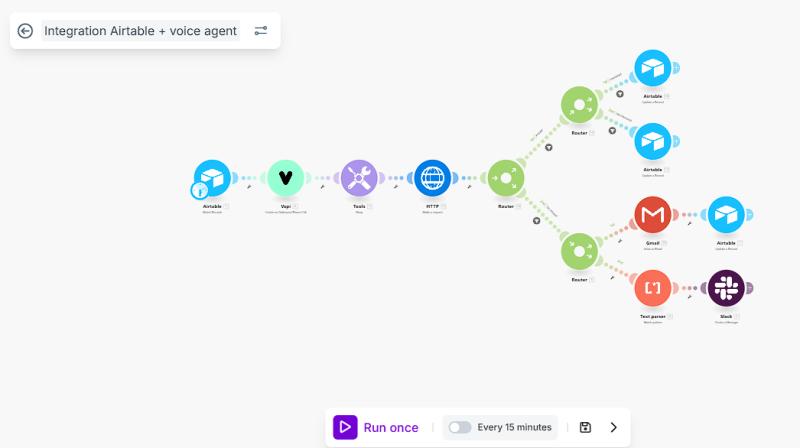
Make — Airtable watch into Vapi, then routers branching to Airtable updates, Gmail, and a parsed message into Slack.
A Make scenario that watches an Airtable base and hands each new record to a Vapi voice agent. Once the call is done it pulls the result back over HTTP and routes on what came back: records updated in Airtable, an email out through Gmail, or the transcript run through a text parser and posted into Slack. It runs on a fifteen-minute schedule.
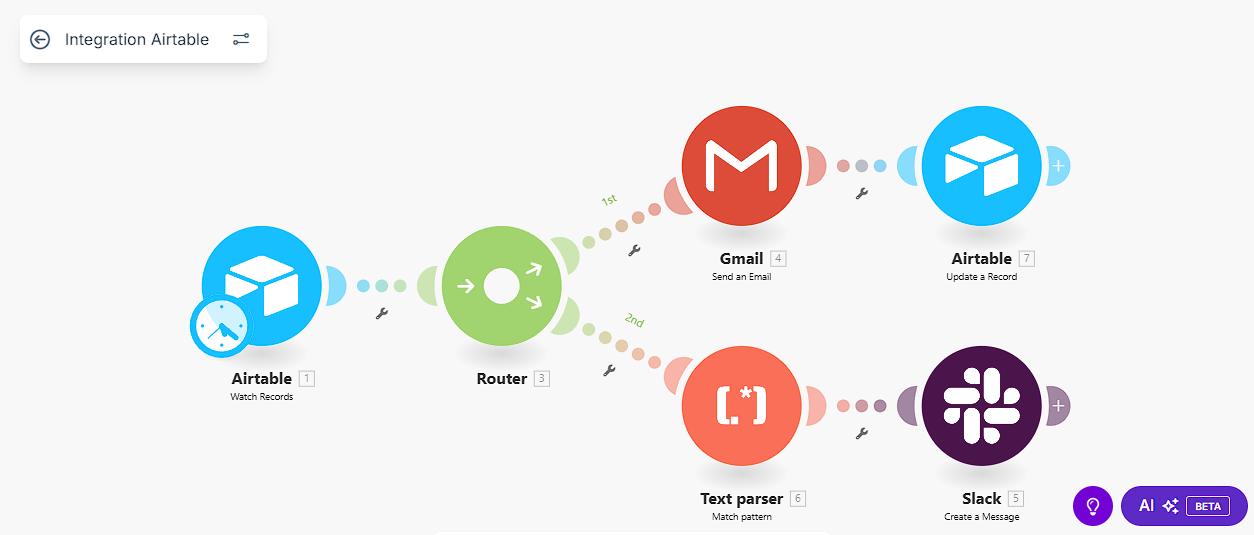
The earlier scenario without the voice layer — Airtable watch, router, Gmail one way and a parsed Slack message the other.
Built in two stages. The plain version came first: watch Airtable, route, email through Gmail on one branch and parse into Slack on the other. The voice layer went on the front once that part was reliable — which is the right order, because a voice transcript is far messier than a form submission and has to be routed on content rather than on field names.
Make (Integromat)VapiAirtableGmailSlackHTTP requesttext parserrouter
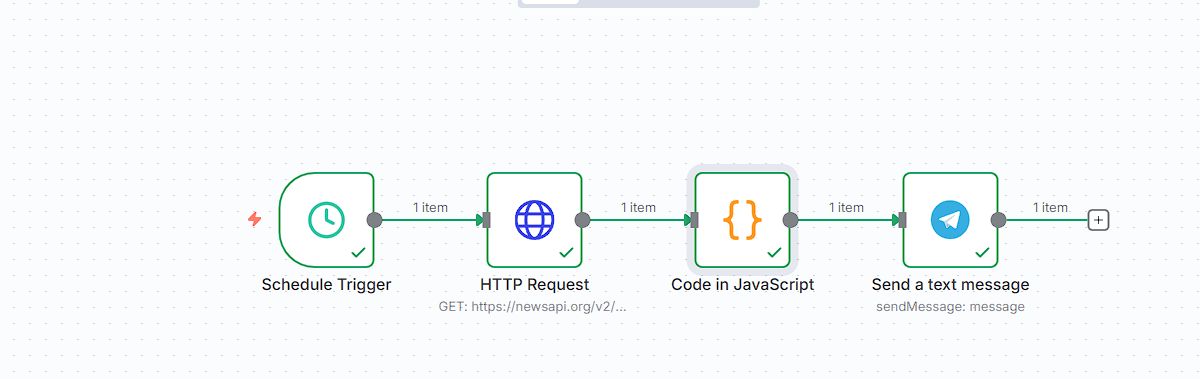
A scheduled workflow that pulls the day’s top headlines, formats them, and delivers them to a Telegram bot every morning with no manual step. Small on purpose — it was the build where I got the scheduling, request, formatting and delivery chain right end to end before putting those pieces into anything larger.
n8nNewsAPITelegram Bot APIscheduled triggers
Experience
Exile Automate — Kozhikode, Kerala
AI Automation Developer · full-time · Mar 2026 — present
AI Automation Developer · internship · Dec 2025 — Mar 2026
Working inside the delivery team on client automation builds: developing and testing n8n workflows and API integrations, applying reliability patterns before handover — webhook signature verification, duplicate-execution guards, retry logic, API rate-limit handling — and documenting how each workflow behaves so the team can maintain it.
Independent
Automation developer · 2025
Scoped and delivered a multi-agent task-management system for a first client, ahead of joining Exile Automate.
What I work with
AI and LLM development
Agent architecture · tool calling · memory and context management · multi-agent routing · human-in-the-loop approval stops · guardrails and grounding · prompt engineering · structured outputs · RAG · embeddings · vector databases (Pinecone) · model selection and token cost control · OpenAI API · Anthropic Claude API · Google Gemini · Groq
Automation and integration
n8n · Make · Gmail API · Google Calendar API · Google Workspace APIs · Telegram Bot API · WhatsApp Business Cloud API · Meta Graph API · Notion API · Slack · webhooks · scheduling and triggers · error handling and fallback paths
Databases, cloud and tooling
PostgreSQL · Supabase · Google Sheets as a data store · Notion databases · Airtable · Git and GitHub · Google Cloud project and OAuth app setup · self-hosted deployment · execution logging and monitoring
AI-assisted development
Claude Code · Codex · Antigravity · ChatGPT · Claude
Explaining and documenting
Technical write-ups · API and workflow documentation · handover notes · explaining systems to non-technical people